ClearKitHome

Free · Private · 100% Local

Clear everything. Keep your logins.

ClearKit wipes history, cache and cookies in one click — or on a schedule you set — while a whitelist protects the sites you stay signed in to. Nothing leaves your browser.

  • No account
  • Works offline
  • Free forever

v0.1.1 · Chrome 102+ · Also works on Edge, Brave, Arc, Vivaldi and Opera

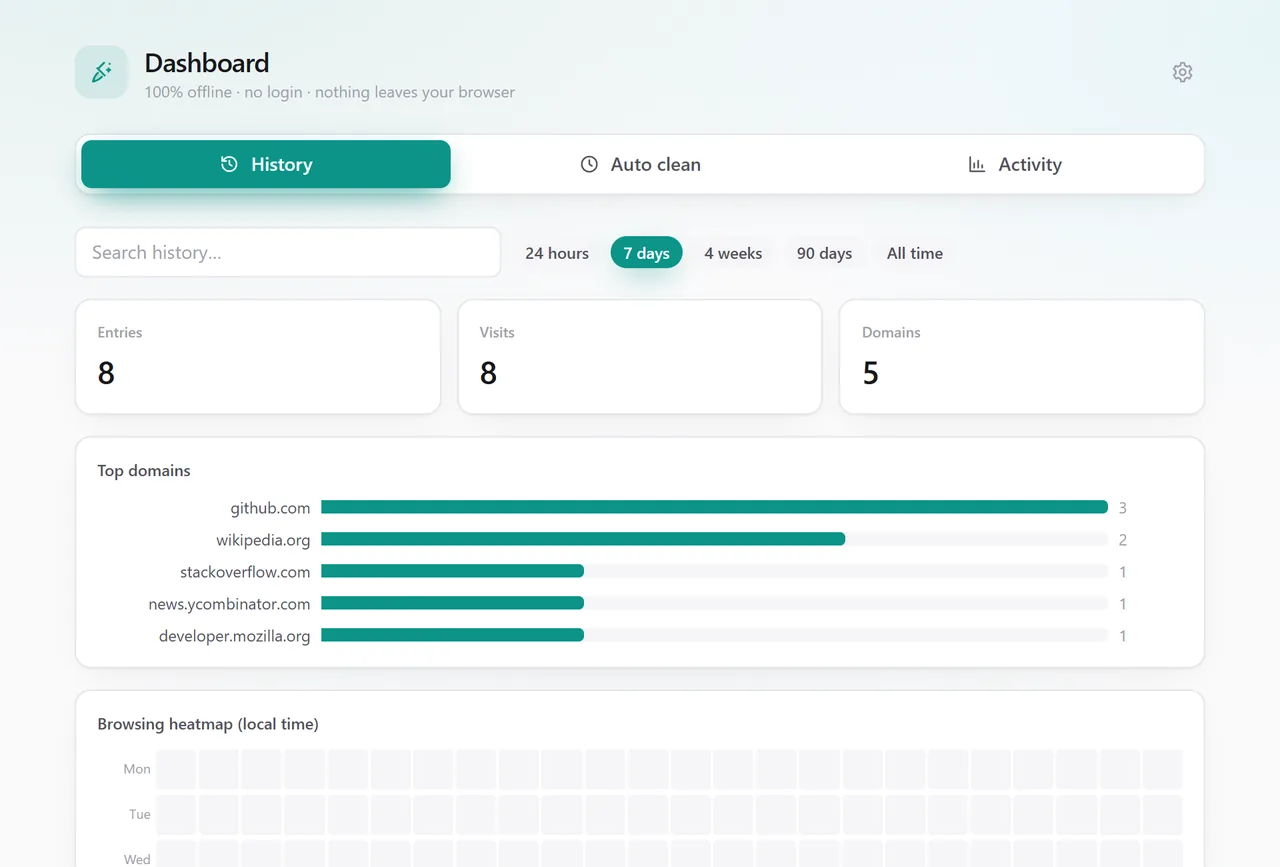
ClearKit — history dashboard
The ClearKit dashboard showing history search, top domains and a browsing heatmap
Data types you can clear
13Data types you can clear
Time ranges, 1 minute to all time
12Time ranges, 1 minute to all time
Bytes that leave your browser
0Bytes that leave your browser
Languages in the extension
27Languages in the extension

13 data types · 12 time ranges · 27 languages

Cleaning your browser shouldn't log you out of it

Every cleaner runs into the same trade-off: cookies are what trackers rely on, but they are also what keeps you signed in. Wipe them and the tracking goes — along with your mail, your repos, your bank and every other session you had open. So most people quietly stop cleaning. ClearKit removes the trade-off instead.

Without a whitelist

You clear cookies, the tracking is gone — and so are forty logins. The next morning goes on passwords and 2FA codes instead of work.

With ClearKit

Whitelist the handful of sites you actually live in. Everything else gets wiped — history, cache, cookies, site data — and those sessions stay exactly where you left them.

Features

A cleaning centre, not a single button

Manual cleaning done the convenient way, scheduled cleaning other extensions charge for, and three things nobody else offers together.

One-click cleaning

Pick from 13 data types across 12 time ranges — the last minute through all time. Pin the types you use most so they are preselected, confirm before wiping (or switch that off), and get a badge, a notification and a quiet animation when it is done.
A whitelist that keeps you signed in

Protect the domains you care about: cookies, cache and site data for whitelisted sites are skipped, so your history clears clean while Gmail, GitHub and the rest stay logged in. A reverse mode flips it — clear only the sites you list.

Clear this site

One tap on the current tab wipes its cookies, cache and site data — and, if you want, every history entry for that domain, subdomains included.

Panic shortcut

Alt+Shift+C runs your preset instantly — no popup, no questions — and can close every tab and open a fresh window for a leave-no-trace retreat.

Scheduled auto-clean

Rules that run in the background every 15 minutes to 24 hours, or at browser startup. Free, with no subscription and no upsell. Sensitive types stay off by default, so nothing vanishes while you are typing.

History dashboard

Search and filter your history, delete it grouped by domain, and read your own patterns off a top-sites list and a browsing heatmap. Every clean is logged locally, and official links jump to the server-side search history you cannot delete on your own machine.

100% offline, no login

Everything runs inside your browser. No account, no backend, no analytics, no tracking — nothing ever leaves your device.

Inside ClearKit

Three screens, no learning curve

The popup for everyday cleaning, the dashboard for what your browser remembers, and settings you touch once.

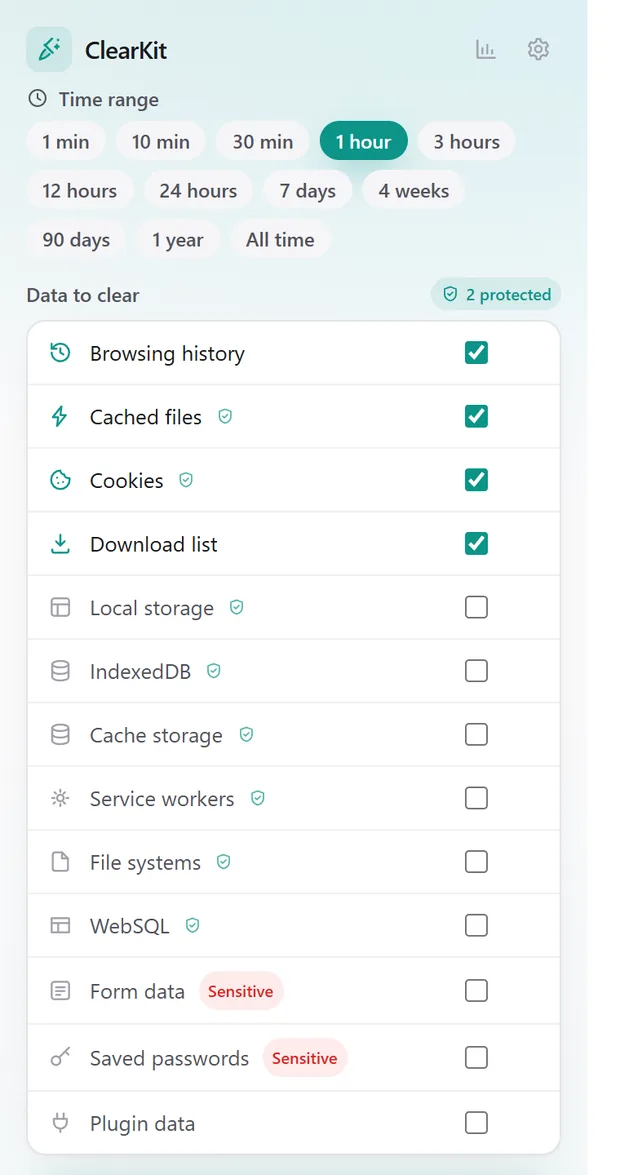
ClearKit — popup
ClearKit popup with the time range selector and the list of data types

Clean in two taps, without thinking about it

Set the time range, tick the data types — or just use the ones you pinned — and clear. The site you are on gets its own card at the top, so wiping one domain never means wiping everything.

ClearKit — history dashboard
ClearKit history dashboard showing search, top domains and a browsing heatmap

See what your browser remembers

Search history by keyword and date, group it by domain to delete in bulk, and read your own patterns off a top-sites list and a browsing heatmap. Every clean ClearKit runs is logged locally, so you can always see what happened and when.

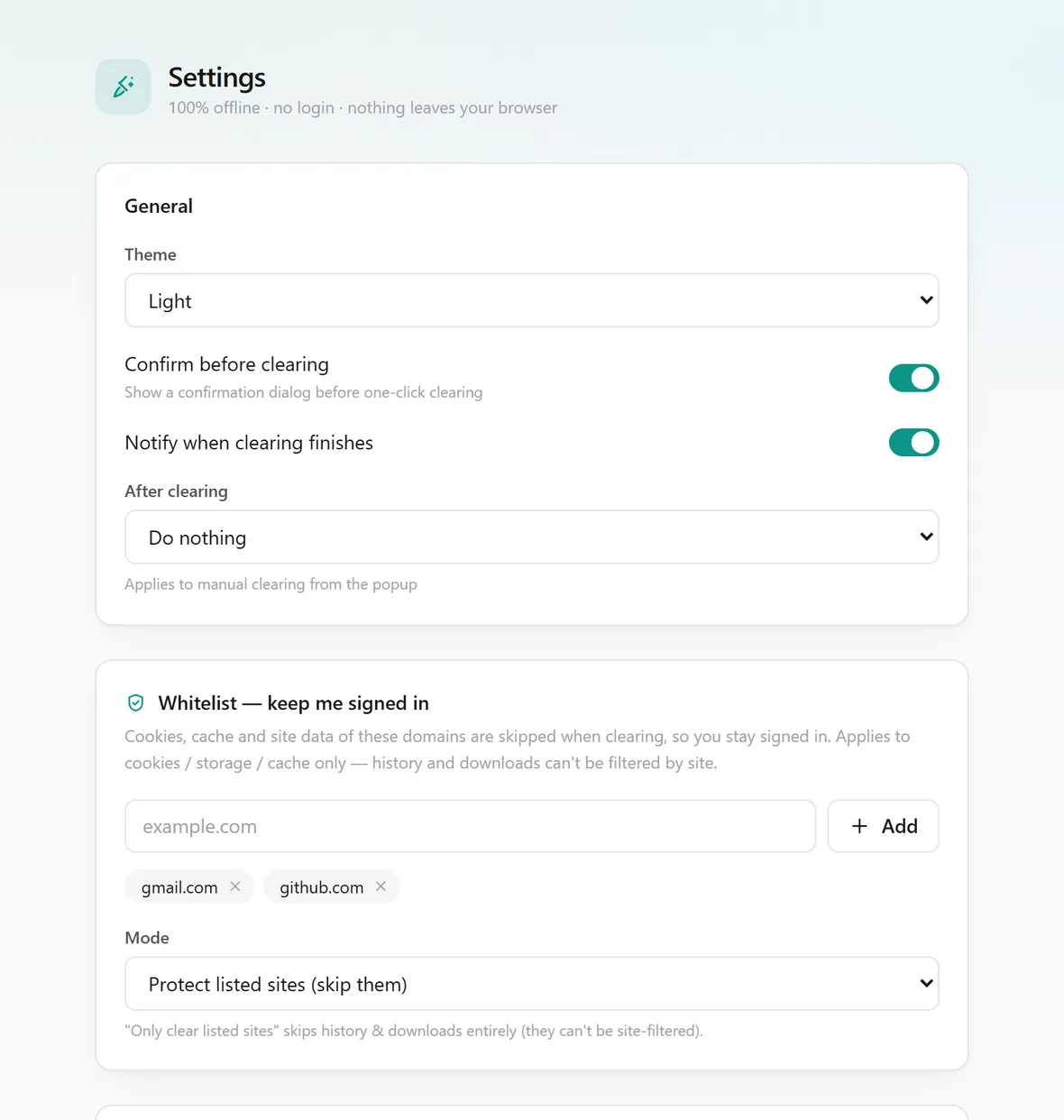
ClearKit — settings
ClearKit settings page showing the whitelist and auto-clean rules

Set it once, then forget it

Build your whitelist, choose the preset the panic shortcut fires, and add auto-clean rules that run every 15 minutes to 24 hours or at startup. Dark and light follow your system.

Permissions

Six permissions, each with a reason

ClearKit asks for the minimum a cleaner can work with — and explains every one of them here rather than burying it in a policy.

PermissionWhat it is used for
browsingDataDoes the actual clearing — history, cache, cookies and site data. Your whitelist is enforced here, so protected sites are skipped.
historyPowers the local history dashboard: search, statistics and per-domain deletion. Read and deleted on your device only.
storageSaves your settings, auto-clean rules and the local event log (the last 200 runs) in the browser's own extension storage.
alarmsRuns your scheduled rules on the cadence you chose — every 15 minutes to 24 hours, or at browser startup.
notificationsTells you when a clean has finished. Only ever in response to your own action or your own rule.
activeTabReads the current tab's domain while the popup is open, so "Clear this site" knows what to target.

No host permissions, no cookies permission, no scripting or tabs permission. ClearKit never runs code on the pages you visit, and no remote code is ever loaded.

Nothing to collect, because nothing is sent

ClearKit has no account system and no server. Your history, settings and rules stay in your browser's local storage. This website is static too — no cookies, no analytics, no third-party scripts.

Read the full privacy policy
  • No sign-in, ever
  • No analytics or telemetry
  • No remote code
  • Every permission explained in plain words

Guides

How to clear browsing data, properly

Short, practical walkthroughs: what Chrome can do on its own, where it falls short, and how ClearKit fills the gap.

FAQ

Questions people ask before installing

If yours is not here, email me — the address is on the support page.

Clean browser. Same logins.

Install ClearKit and spend one minute whitelisting the sites you live in. That is the whole setup.

Free · No account · Works offline